

- What are the System Requirements?
Vacation RentPro runs Windows 11, 10, 8, 7, Vista, XP, and Window Server. Windows 11, 10, or Window Server is preferred for a better appearance. (See below for running on a Mac). VRP requires a basic system with 500mb of available disk space, and 2gb of memory.
Microsoft Outlook (version 365, 2010, or higher) is recommended, but not required. Outlook works with any mail service such as Gmail, Hotmail, etc. Using Outlook is not required, but it does allow additional features in VRP, including optional integration with Outlook Calendar, the ability to read and reply to email inquiries directly from your Inbox, the ability to import Contacts, along with other features. Note: VRP can still send emails without Outlook, (using Gmail, etc), but Outlook is preferred for the reasons mentioned.
If you plan to use VRP on a local network to share data between multiple computers, then it’s recommended that your computers are wired to the router for the best performance and reliability. Depending on the amount of data you eventually have within VRP, a router with “Gigabit” Ethernet ports is recommended. Gigabit routers are inexpensive and pretty standard these days for a local network. - Does VRP run on a Mac?
Vacation RentPro is designed to run under the Windows operating system. In order to run Windows and VRP on a Mac, you can use a popular product called Parallels – to run Windows on Mac OS X without rebooting. (Click here to save $10). - Can I access my data from Remote Locations?
Please see the Web Access page for remote access options. - Can I view or update my data from an iPhone or Smart Phone?
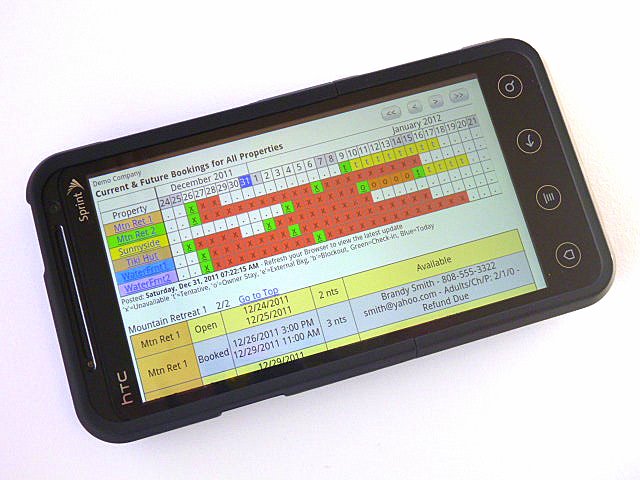
You can View certain data, but not update it. The software includes an option to upload a formatted list of your Bookings and Availability to a web page in a secured folder on your web site, which can be viewed from Phones or a Web browser while you are away from the computer. See an Example Here. This option also allows syncing the list to a folder on your PC, which you can optionally sync with your phone and other devices using file sync software such as DropBox.
In addition, if you need to update your data remotely, you can use any of the smart phone products that allow you to access your PC, such as: LogMeIn-Ignition for Android phones, and LogMeIn-iOS for iPhones and iPads. For more products and info on remote access options, please see our Web Access page. - Can VRP run on a Cloud service?
Yes, VRP can run on application Cloud services, such as https://kamatera.com or https://trapptechnology.com/ . Trapp Technology is very familiar with VRP and they do the setup for you. Kamatera is less expensive, and also offers managed support. Please contact them for more details.
You can also use Amazon AWS, Rackspace, or other application cloud hosting services. - Can I generate PDF documents which can be e-signed by guests?
Yes, PDF documents and agreements can be automatically generated (with or without Fill-in fields), and easily used with Adobe EchoSign™ and other services for requesting e-signatures from guests. Please see the link for more info about Adobe EchoSign. (Note: Adobe Reader X or higher is required for generating EchoSign documents). - What type of support can I expect?
We are happy to answer short questions as long as you’re current with the Annual Support / Updates renewal. Usually, these result in directing people to specific topics in the Help document within the software. If you feel you need more help, and the calls will extend beyond 10 minutes, we ask that you purchase 1 or 2 hours of remote training ($65/hr) on the Purchase page. We put a lot of effort into making the software as easy and intuitive as possible, while providing a wide range of features and full documentation. Usually, once people start using the basic features and get familiar with searching for keywords in the Help document, they are off and running on their own. - What are your hours of support?
We are available 7 days a week, usually from 7am to 9pm, Hawaii time. You can email or call us anytime. If we cannot answer immediately we will get back to you very soon. Please note, if your questions are many or tend to be open-ended, we prefer that you call us, as it is easier to answer these types of questions with a phone call. - Can I upgrade my license for additional properties or users in the future?
Yes, we do not charge any additional fee for doing so. However, you must be current with your annual support renewal. Simply purchase the price difference for the new license on the Purchase page. - How does Vacation RentPro compare to other VR software?
As far as a feature for feature comparison, that is a difficult task, as many software vendors do not advertise their price nor provide an evaluation easily. We strongly believe that Vacation RentPro offers the best VR solution with the widest range of features and the absolute best price. Our customers agree, and we continually receive praise and Compliments from people who have used other VR solutions in the past. VRP is a mature product and was first introduced in January, 2006. Since that time, we have incorporated a wide range of features for special needs of all types of VR management requirements, (see the Updates page). We have many customers who are using VRP after having spent a lot of money and time with other software vendors, and are thrilled to have found us. We openly list all of the features, price options, documentation, and provide a trial download without any questions asked. We think this is the way software ought to be. You should be able to see exactly what you’re getting and for how much, right up front. In the end, it all depends on how the software looks and feels to you and the features it provides. We are confident in our product, and we openly invite you to see for yourself how Vacation RentPro can work for you. - Are there any recurring charges?
No! Once you purchase a license, there are no recurring charges, other than after the first year you may optionally choose to continue to receive new updates to the software and support. See below. - What is the $89 annual support / updates renewal option?
The software license includes one full year of updates and support. If, after the first year you wish to continue to receive the latest updates of VRP and support, you can optionally purchase an additional 1 year renewal for $89 from the Purchase page. Please note, this is the current renewal price (and has been for 4 years), however it is subject to change. Also, the annual support / updates includes support for answering quick questions (not training). If you need training, please purchase Training separately on the Purchase page. - How much does it cost for the Online Bookings option through AvailabilityOnline?
One of the reasons we decided to build the optional interfaces with AvailabilityOnline is because they offer the absolute best price available for providing online bookings capability. As of February, 2020 the price for AvailabilityOnline is only $95.00 / year for unlimited properties. Other sites we looked at charge an average of $29/month per property. Please see our Online Bookings page for more info about AvailabilityOnline and their interface with VRP.
Please note, that the feature to interface with AvailabilityOnline is only included with certain licenses, as explained on the Purchase page. - How does VRP integrate with my Website?
VRP can optionally create and upload Property Pages and Property Group Pages to your website, complete with calendars, rates, photos, etc. These can easily be linked to or displayed within your existing website, or they can act as stand-alone web pages. Here is an Example Website integrated with Vacation RentPro.
If you wish to post Availability Calendars only (and not property pages, photos, etc.), then VRP has two options for integrating Availability Calendars with your existing website property pages. The first option simply uploads html pages to your existing website using the FTP server name, account/password and folder/file name you specify. This can be specified at the property or property-group level in VRP. You can then simply add “links” to your existing website such as: “Click here to check Availability“, or you can embed the calendars within your own website pages. You can then quickly update any changes to your web Availability Calendars and Rates for all properties within VRP as often as you like – with just one click.
The second option for integrating just the calendars with your existing website is using AvailabilityOnline.com and the interface VRP provides. AvailabilityOnline includes information on their sites for how to integrate Availability Checking and Online Reservations into your existing website property pages, (by inserting the html code they provide). Please see their sites for more info. Please note, that the feature for integrating with AvailabilityOnline is only included with certain licenses, as explained on the Purchase page.
In addition, VRP can optionally post Cleaning Schedules to your website, as well as generating Housekeeping Cleaning Schedule reports, and optionally emailing cleaning notices to cleaners. - Is there any way to link VRP with HomeAway, VRBO, Airbnb, Booking.com, and other popular website calendars?
Yes, VRP can optionally interface with HomeAwayPM accounts (a PM account with HomeAway is required). This allows updating calendars and/or rates on VRBO™ and/or HomeAway™. VRP also integrates with 2 channel managers (BookingPal and RedAwning), which integrate with Airbnb, Booking.com, TripAdvisor and others. VRP can also automatically export iCal Calendars to your own FTP Web site. iCal Calendars can then be automatically imported into VRBO™, AirBnB™, Google™, Outlook™ and other calendar systems to keep those calendars updated.
Please note, that these features are only included with certain licenses, as explained on the Purchase page. - Is there a Credit Card or eCheck Payment Processing feature?
Yes. VRP includes 2 options for Payment Processing. The first option (recommended), is a direct interface with VacationRentPayment.com (owned by Velo Payments) for full credit card transactions, including: charges, pre-authorizations, refunds and cancels.
For the smoothest payment processing within VRP we recommend Vacation Rent Payment.
Vacation Rent Payment – Support for New and Existing Customers:
VR Payment Help Center: https://vacationrentpayment.zendesk.com/hc/en-us
Support Contact Form: https://vacationrentpayment.zendesk.com/hc/en-us/requests/new
Email: customersuccess@yapstone.com
VR Payment is familiar with the special rates offered to Vacation RentPro customers. Be sure to tell them you are using, (or are considering using), the integration with Vacation RentPro software.
The second option is a feature which lets you interface with other web-based Payment Processing services (with Virtual Terminals) that you wish to use or already have. This feature displays your Payment Processing website’s Virtual Terminal and can automatically fill in the required information while you observe and verify the details, including credit card number, Tenant name, address, amount, etc. with just one click. This feature can also be used with other web-based forms, such as when another management company requires updating their web form when you book a property. Note: This option may or may not work with your particular merchant virtual terminal. We do know that it works with PayPal, PPI, Moneris and some others, but we cannot guarantee it will always work since we have no control over how they design their virtual terminals.
Neither of these options require any recurring fees paid to us.
Our recommendation is to use the first option (Direct interface with Vacation Rent Payment). They provide the absolute best rates we have found, and the interface with VRP makes processing payments quick and easy. They are a solid and reliable company and a large player in the vacation rental industry. Please contact them (see above) for rates and info on their services, and let them know if you are considering or planning to use Vacation RentPro’s interface.
Please note, that the Payment Processing features are only included with certain licenses, as explained on the Purchase page. - How Good is the Documentation?
Vacation RentPro’s Help and User Manual is probably the most complete and thoroughly documented user manual you will find. We spend “tons” of time on this, and feel that any software is only as good as its ease of use and the ability to quickly find help and the information you need.
You can preview the Documentation here which is also included in the software. In addition, in order to help people who are looking to get quick overview of the software, you can view a Slideshow of the Vacation RentPro – Vacation Rental Software here, complete with screens, report samples, web pages and more.
Other Questions?
You can Contact us by phone or email.